The vibrant world of digital design often comes with a perplexing array of tool choices and pricing models. For many, Figma stands out as an industry leader, but navigating its various plans can be challenging, especially when balancing features, team size, and budget. Understanding Figma pricing is crucial for small and medium-sized businesses (SMBs), municipal organizations, design team leads, and individual creators looking to optimize their workflow without overspending. This comprehensive guide will break down all Figma plans, helping you compare features, evaluate versus , and confidently determine the best that fits your design needs and long-term goals.
What is the Figma Starter Plan?
The serves as Figma’s robust free tier, offering a powerful entry point into collaborative design. This plan includes unlimited files, allowing users to create as many design projects as needed, though it’s limited to up to 3 project files per team. You can invite unlimited collaborators to your files, enabling real-time co-editing and feedback. Basic version history is also included, tracking changes for up to 30 days.
Key limitations of the include its restricted version history, meaning you can only revert to changes made within the last 30 days. Team projects are also limited, which can hinder larger team organization. Advanced features like Dev Mode (for developer handoff) or shared components (for consistent design systems) are not available. This free tier is often sufficient for individual designers, students learning the ropes, or very small teams working on non-complex, short-term projects.
Common Questions About Figma’s Free Access
Many prospective users ask, and ? The answer is yes, Figma offers a comprehensive free tier, as described above. However, it’s important to clarify its limitations compared to paid plans, which unlock more advanced collaboration, history, and organizational features. For whom is truly applicable generally focuses on solo users or those with minimal team collaboration needs where basic project organization is sufficient. As soon as a team grows or requires more extensive version control and shared assets, a paid upgrade becomes beneficial.
Specific Use Cases for Free Figma
A common query is is free for commercial use. While you can certainly create and manage commercial design work within the free , extensive team collaboration, advanced prototyping, and shared design systems for larger commercial projects may necessitate an upgrade. The free plan is perfectly capable of producing high-quality commercial assets for individual use. Furthermore, many ask is free for mac users. Figma is a browser-based tool, meaning it is accessible via any modern web browser on any operating system, including macOS, Windows, and Linux, making it universally available without specific OS limitations.
A Deep Dive into Figma’s Paid Plans: Professional, Organization, and Enterprise
Understanding the Core Figma Pricing Structure
Figma pricing tiers are structured to scale with your team’s size and feature requirements. This typically involves seat-based billing, where you pay per active user or ‘seat.’ Figma offers different seat types: Full (designers), Dev (developers using Dev Mode), View (for commenting and inspecting), and Collab (for limited editing in FigJam). These are designed to grow, with each tier offering increasing levels of functionality, enhanced security, and more robust administrative control to accommodate evolving team needs.
Professional Plan: Features, Costs, and Ideal Users
The Professional plan is a significant step up from the free tier, tailored for growing teams. Its features include unlimited files and projects, advanced prototyping capabilities, and the crucial ability to create and use shared team libraries, ensuring design consistency across projects. It also offers unlimited version history for all files, allowing you to track and revert changes indefinitely, and full access to Dev Mode for seamless developer handoff.
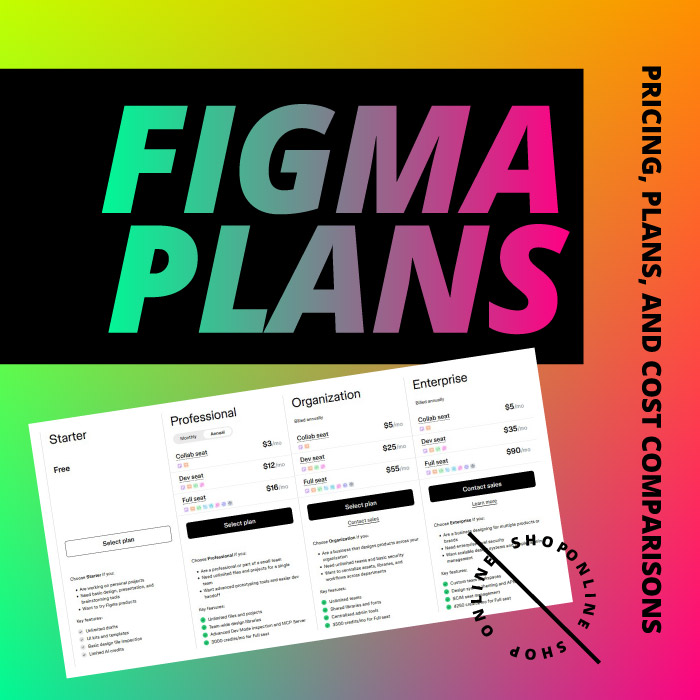
Regarding , the typical monthly per full design seat is approximately $15 per editor when billed monthly, or $12 per editor when billed annually. Dev Mode seats are priced similarly. This model is ideal for small to medium-sized design teams, typically ranging from 2 to 20 designers, who require robust collaboration tools, shared assets, and comprehensive version control. The value proposition of this plan lies in its ability to streamline workflows, improve collaboration, and ensure design consistency for agencies and in-house design teams.
Organization and Enterprise Plans: Advanced Capabilities and Value
For larger teams, departments, or entire corporations, Figma offers its Organization and Enterprise plans. These advanced come with features like centralized administration for easier user management, Single Sign-On (SSO) for enhanced security and streamlined access, advanced security settings, and the ability to manage private plugins and custom fonts. Analytics and dedicated customer support are also included, providing deeper insights and assistance.
The proposition for these corporate environments emphasizes enhanced security, scalability, and compliance features, which are critical for large organizations. The model for these tiers is typically custom, often requiring direct sales engagement with Figma to tailor a solution to specific needs. Moving from a Professional plan to an Organization plan represents a significant price jump due to the comprehensive features and enterprise-grade controls. These bespoke solutions cater to complex organizational structures, offering advanced controls and integrations necessary for large-scale operations.
Visualizing the Options: The Figma Pricing Table
A is an invaluable tool for comparing the different tiers at a glance. It typically presents a side-by-side comparison of features and costs for the Starter, Professional, Organization, and Enterprise plans. Key comparison points users should look for include:
- Seat types: Differentiating between Full, Dev, View, and Collab seats and their respective functionalities.
- Per-user : Clearly showing monthly and annual rates for each editor type.
- Number of projects: Detailing limitations on projects per team for the free tier, and unlimited for paid plans.
- Version history: Highlighting the 30-day limit for Starter vs. unlimited for Professional and higher.
- Security features: Outlining SSO, advanced security, and admin controls available in higher tiers.
- Administrative controls: Explaining centralized management and user provisioning.
Readers are advised to use such a table as a quick reference to identify the features most critical to their workflow and make informed decisions based on their budget and team requirements.
Special Considerations: Figma for Education and Community Insights
Figma for Students and Educators
Figma provides significant benefits for students and educators through its special programs. Confirming is free for students and educators, Figma offers free access to its Professional plan features for eligible individuals and institutions. The program outlines specific eligibility requirements, which typically include a valid school email address and verification of enrollment or faculty status. For an eligible or educator, this means access to powerful tools like unlimited version history, shared team libraries, and advanced prototyping capabilities without any cost, empowering learning and teaching within a professional-grade environment.
Future Outlook and Community Discussions
Regarding , users should be aware that software pricing models are subject to updates. Figma has made changes in the past, such as introducing new seat types or adjusting bundling options. Users are advised to stay informed about official announcements from Figma to understand any anticipated changes to structures. Discussions on and other community forums are valuable sources for real-world user opinions, common concerns, and practical advice on navigating plan choices. These platforms offer peer perspectives and insights into how different teams utilize and manage their Figma subscriptions. Additionally, users can look out for or other potential seasonal deals and promotions. Monitoring official Figma channels and social media during these periods may yield limited-time offers, especially for annual subscriptions, which can provide significant savings.
Maximizing Your Investment: Evaluating Figma’s Value and Long-term Planning
Beyond the Price Tag: Assessing Figma’s True Value
When considering Figma, it’s essential to move beyond just and evaluate its true worth. Figma’s extensive features, real-time collaborative capabilities, and robust plugin ecosystem translate into increased productivity, faster design cycles, and a higher return on investment (ROI) for businesses. The of the platform, in terms of its perceived overall worth to a design team or organization, stems from factors like reduced tooling complexity (as it often replaces multiple tools), improved communication among stakeholders, and centralized asset management that ensures consistency. By streamlining workflows, Figma helps teams achieve tangible savings in time and resources, ultimately contributing to business growth and efficiency.
Strategic Figma Planning for Growth
Effective involves choosing a that not only meets current design needs but also anticipates future team growth and evolving project requirements. Teams should consider their long-term business goals, potential for scalability, and any anticipated changes in team structure or project complexity when selecting a . For instance, a rapidly growing startup might opt for the Professional plan knowing they can easily upgrade to Organization as their needs become more complex. It’s also advisable to periodically review plan usage to optimize and ensure the chosen plan continues to provide the best for the investment.
Understanding Figma in the Market Context
While directly impacting user pricing, understanding Figma in the broader market context can add confidence to an investment decision. Mentions of and are indicators of the company’s market stability and long-term presence in the industry. A robust company valuation often suggests continued investment in product development, security, and support, reassuring users about the longevity and evolution of the platform they choose to integrate into their core workflows.
Conclusion
The ideal Figma pricing hinges on a careful balance of features, team size, budget, and specific design requirements. From the robust to advanced enterprise solutions, Figma offers a spectrum of choices designed to cater to diverse needs, each providing distinct . Don’t let be a barrier to powerful design. Start by exploring the free to understand its capabilities. Then, leverage this guide, in conjunction with Figma’s official resources, to compare paid plans based on their unique propositions. Choose wisely, and empower your design workflow with the right that best supports your individual or organizational goals.